If you only wish to extract the alpha value for a color, you can simply extract it like so:
<?php
$color = imagecolorat($im, 50, 50);
$alpha = $color >> 24;
?>
It actually shifts off the first 24 bits (where 8x3 are used for each color), and returns the remaining 7 allocated bits (commonly used for alpha)imagecolorallocatealpha
(PHP 4 >= 4.3.2, PHP 5, PHP 7, PHP 8)
imagecolorallocatealpha — Bir görüntü için alfa kanallı bir renk ayırır
Açıklama
imagecolorallocatealpha(
GdImage
int
int
int
int
): int|false
GdImage
$görüntü,int
$kırmızı,int
$yeşil,int
$mavi,int
$alfa): int|false
imagecolorallocatealpha() işlevi
alfa bağımsız değişkeni ile ek olarak şeffaflık
belirtilebilmesi dışında imagecolorallocate() işlevine
eşdeğerdir.
Bağımsız Değişkenler
görüntüimagecreatetruecolor() gibi bir görüntü oluşturma işlevinden dönen bir GdImage nesnesi.
kırmızı-
Kırmızı bileşenin değeri.
yeşil-
Yeşil bileşenin değeri.
mavi-
Mavi bileşenin değeri.
alfa-
0-127 arasında belirtilebilir.
0tamamen mat,127ise tamamen şeffaf demektir.
kırmızı, yeşil ve
mavi değerleri onluk tabanda 0-255 aralığında,
onaltılık tabanda 0x00-0xFF aralığında belirtilebilir.
Dönen Değerler
Renk ayrılamazsa false, aksi takdirde rengin indisini döndürür.
Uyarı
Bu işlev mantıksal false
değeriyle dönebileceği gibi false olarak değerlendirilebilecek mantıksal
olmayan bir değerle de dönebilir. Bu konuda daha fazla bilgi
Mantıksal Değerler bölümünde
bulunabilir. Bu işlevden dönen değeri sınamak için
===
işleci kullanılabilir.
Sürüm Bilgisi
| Sürüm: | Açıklama |
|---|---|
| 8.0.0 |
görüntü bağımsız değişkeninde artık
bir GdImage nesnesi aktarmak gerekiyor; evvelce
resource türünde geçerli bir gd değeri
gerekirdi.
|
Örnekler
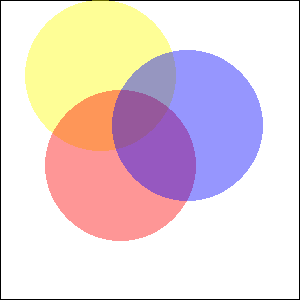
Örnek 1 - imagecolorallocatealpha() örneği
<?php
$size = 300;
$image=imagecreatetruecolor($size, $size);

// Siyah kenar çizgili beyaz artalan
$back = imagecolorallocate($image, 255, 255, 255);
$border = imagecolorallocate($image, 0, 0, 0);
imagefilledrectangle($image, 0, 0, $size - 1, $size - 1, $back);
imagerectangle($image, 0, 0, $size - 1, $size - 1, $border);

$yellow_x = 100;
$yellow_y = 75;
$red_x    = 120;
$red_y    = 165;
$blue_x   = 187;
$blue_y   = 125;
$radius   = 150;

// Renkleri alfa değerleriyle ayıralım
$yellow = imagecolorallocatealpha($image, 255, 255, 0, 75);
$red    = imagecolorallocatealpha($image, 255, 0, 0, 75);
$blue   = imagecolorallocatealpha($image, 0, 0, 255, 75);

// Üst üste üç elips çizelim
imagefilledellipse($image, $yellow_x, $yellow_y, $radius, $radius, $yellow);
imagefilledellipse($image, $red_x, $red_y, $radius, $radius, $red);
imagefilledellipse($image, $blue_x, $blue_y, $radius, $radius, $blue);

// Başlığı çıktılamayı unutmuyoruz!
header('Content-Type: image/png');

// ve sonucu çıktılıyoruz
imagepng($image);
imagedestroy($image);
?>
Yukarıdaki örnek şuna benzer bir çıktı üretir:
Örnek 2 - imagecolorallocatealpha() ile kullanmak için alfa değerlerini dönüştürmek
Genelde 0'lık alfa değerleri tamamen şeffaf pikselleri
belirtir ve alfa kanalının 8 biti vardır. Bu tür alfa değerlerini
imagecolorallocatealpha() ile uyumlu olacak şekilde
dönüştürmek için basit aritmetik yeterlidir:
<?php
$alpha8 = 0; // tamamen şeffaf
var_dump(127 - ($alpha8 >> 1));
$alpha8 = 255; // tamamen mat
var_dump(127 - ($alpha8 >> 1));
?>
Yukarıdaki örneğin çıktısı:
int(127)
int(0)
Ayrıca Bakınız
- imagecolorallocate() - Bir görüntü için bir renk ayırır
- imagecolordeallocate() - Bir rengi tanımsız yapar
+add a note
User Contributed Notes 3 notes
eric (at) junioronline.us 
18 years ago
Brett G 
8 years ago
When working with transparency, avoid imagecreate() and use imagecreatetruecolor() instead. Transparency effects may not work as expected within a palette-based image.
fjoggen at gmail dot com 
16 years ago
If you need to calculate the integer representation of a color with an alpha channel, without initialising an image and using the imagecolorallocatealpha function. Then this function might be of some help:

<?php
function alphaColor($hexColor,$alpha)
{
        return bindec(decbin($alpha).decbin(hexdec($hexColor));
}

echo alphaColor("FFFFFF",127);
?>